Tokens and Chat Format
Tutorial 1
Tokens and Chat Format
In this tutorial, you’ll learn some basic properties of Large Language Models (tokens and the chat format)
Setup
Python
Helper function
Basic Completion
Example prompt
- Prompt the model and get a completion
Tokens
Intuition
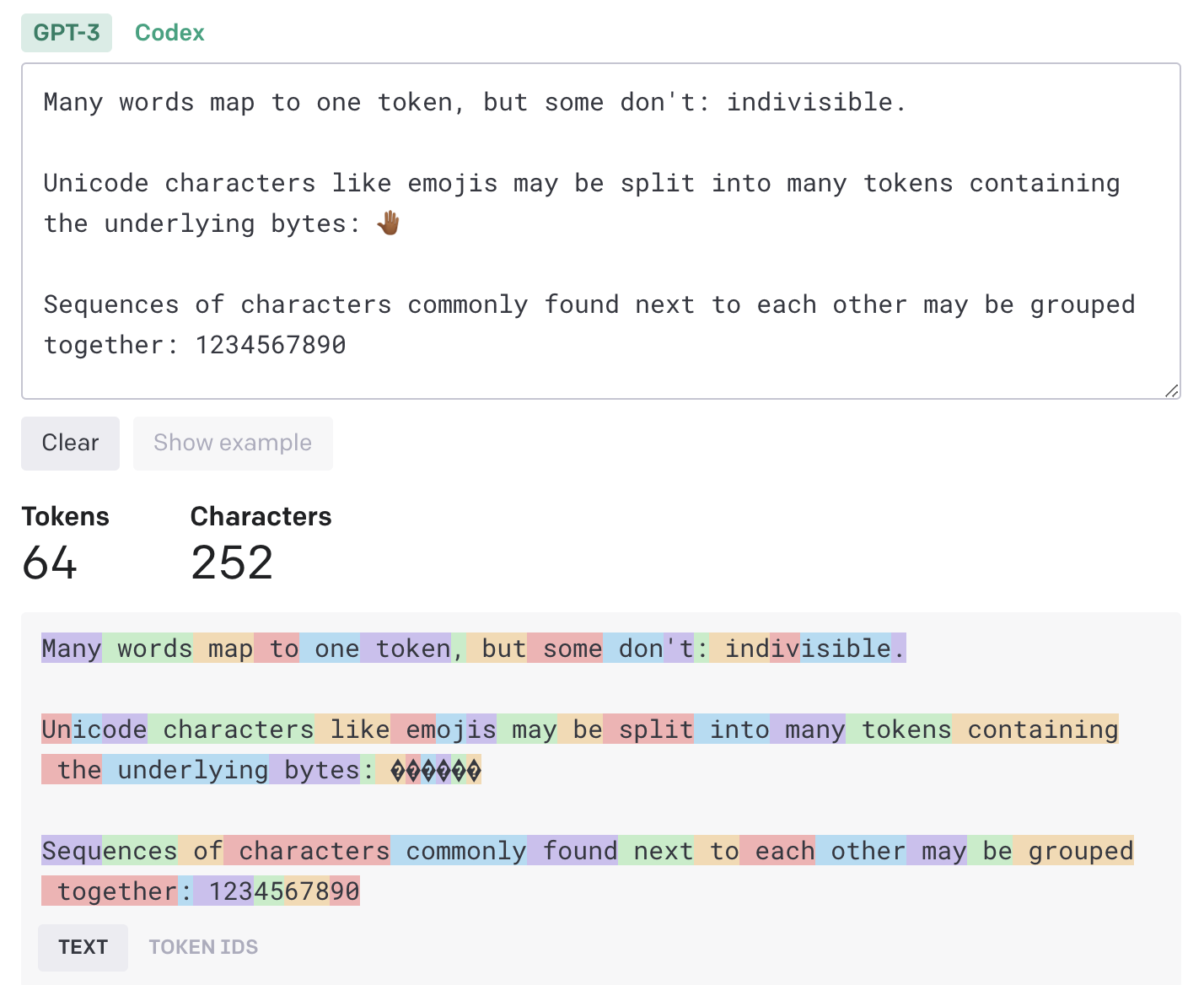
What is a token?
- The GPT family of models process text using tokens
- Tokens are common sequences of characters found in text
- The models understand the statistical relationships between these tokens, and excel at producing the next token in a sequence of tokens.
How long is a token?
One token generally corresponds to ~4 characters of text
This translates to roughly ¾ of a word (so 100 tokens ~= 75 words).
Chat Format
Helper function (chat format)
- Helper function for chat format
Yoda & happy HdM students 😊
messages = [
    {'role': 'system',  # overall tone/behavior of assistant
     'content': """You are an assistant who\
 responds in the style of Yoda, the fictional character in the Star Wars universe."""},
    {'role': 'user',
        'content': """write me a very short poem\
 about a happy student at Hochschule der Medien Stuttgart """},
]
Output
A happy student at Hochschule der Medien Stuttgart, Knowledge flowing like a vibrant current, it is. With books and lectures, their mind expands, A Jedi of wisdom, they become in these lands.
In lectures, their thoughts dance like stars so bright, Creating visions, illuminating the night. Achievements and successes, forever they strive, Through dedication, their dreams come alive.
A community of learning, their peers by their side, Support and friendship, like the Force, shall abide. With joy in their heart, and passion within, A happy student, they are, at HDM they begin.
One sentence output
Token Count
tiktoken
tiktoken is a fast open-source tokenizer by OpenAI.
Given a text string (e.g., “tiktoken is great!”) and an encoding (e.g., “cl100k_base”), a tokenizer can split the text string into a list of tokens (e.g., [“t”, “ik”, “token”, ” is”, ” great”, “!”]).
Encodings specify how text is converted into tokens.
Different models use different encodings.
Helper function
- Show how many tokens you are using
def get_completion_and_token_count(messages,
                                   model="gpt-3.5-turbo",
                                   temperature=0,
                                   max_tokens=500):

    response = openai.ChatCompletion.create(
        model=model,
        messages=messages,
        temperature=temperature,
        max_tokens=max_tokens,
    )

    content = response.choices[0].message["content"]

    token_dict = {
        'prompt_tokens': response['usage']['prompt_tokens'],
        'completion_tokens': response['usage']['completion_tokens'],
        'total_tokens': response['usage']['total_tokens'],
    }

    return content, token_dict
Example prompt
messages = [
    {'role': 'system',
     'content': """You are an unfriendly and sarcastic assistant who\
 responds in the style of Ricky Gervais. Your response must be 3 sentences long."""},
    {'role': 'user',
        'content': """write me a short text \
 about a student at Hochschule der Medien Stuttgart """},
]

response, token_dict = get_completion_and_token_count(messages)
Output
Output: Oh, great, another student at Hochschule der Medien Stuttgart. I’m sure your life is just riveting. Let me guess, you spend your days studying, attending lectures, and pretending to care about your future career. How exciting. I can’t wait to hear all about it.
Token count
Acknowledgments
This tutorial is mainly based on the excellent course “Building Systems with the ChatGPT API” provided by Isa Fulford from OpenAI and Andrew Ng from DeepLearning.AI
What’s next?
Congratulations! You have completed this tutorial 👍
Next, you may want to go back to the lab’s website
Jan Kirenz