Gradio Image Creation App
Gradio Tutorial 3
Jan Kirenz
Image Generation App
In this tutorial, you’ll create an image generation app with a Gradio interface.
This tutorial is mainly based on an excellent course provided by Isa Fulford from OpenAI and Andrew Ng from DeepLearning.AI.
Setup
Python
Load your HF API key and relevant Python libraries
Load model (only Apple Silicon)
- In this example, we demonstrate how to use Stable Diffusion in Apple Silicon (M1/M2).
- You’ll find the Windows and Apple Intel version below.
Load Model (only Apple Intel and Windows)
Optional: API-version
- Only use this code if you want to use the API
# Helper function
import requests, json

#Text-to-image endpoint
def get_completion(inputs, parameters=None, ENDPOINT_URL=os.environ['HF_API_TTI_BASE']):
    headers = {
      "Authorization": f"Bearer {hf_api_key}",
      "Content-Type": "application/json"
    }
    data = { "inputs": inputs }
    if parameters is not None:
        data.update({"parameters": parameters})
    response = requests.request("POST",
                                ENDPOINT_URL,
                                headers=headers,
                                data=json.dumps(data))
    return json.loads(response.content.decode("utf-8"))
Image Generation App
Building an image generation app
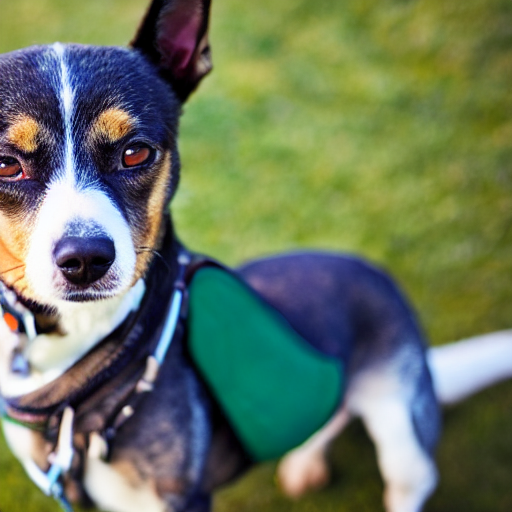
Example prompt
- Here we are going to run
runwayml/stable-diffusion-v1-5using the🧨 diffuserslibrary.
Result
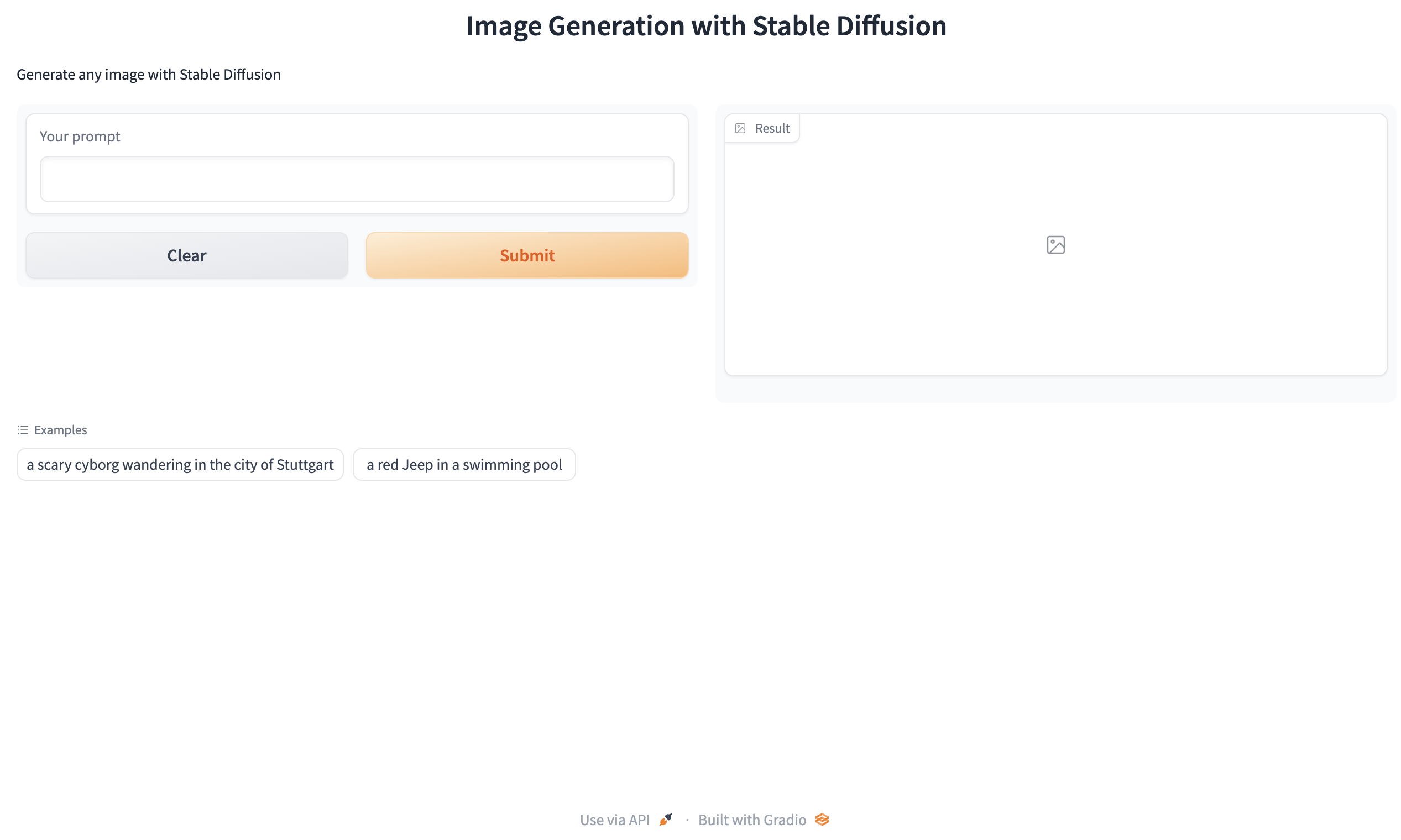
Generating with gr.Interface()
def generate(inputs):
    output = get_completion(inputs)
    return output


gr.close_all()
demo = gr.Interface(fn=generate,
                    inputs=[gr.Textbox(label="Your prompt")],
                    outputs=[gr.Image(label="Result")],
                    title="Image Generation with Stable Diffusion",
                    description="Generate any image with Stable Diffusion",
                    allow_flagging="never",
                    examples=[
                        "a scary cyborg wandering in the city of Stuttgart", "a red Jeep in a swimming pool"]
                    )

demo.launch(share=True)
Gradio user interface
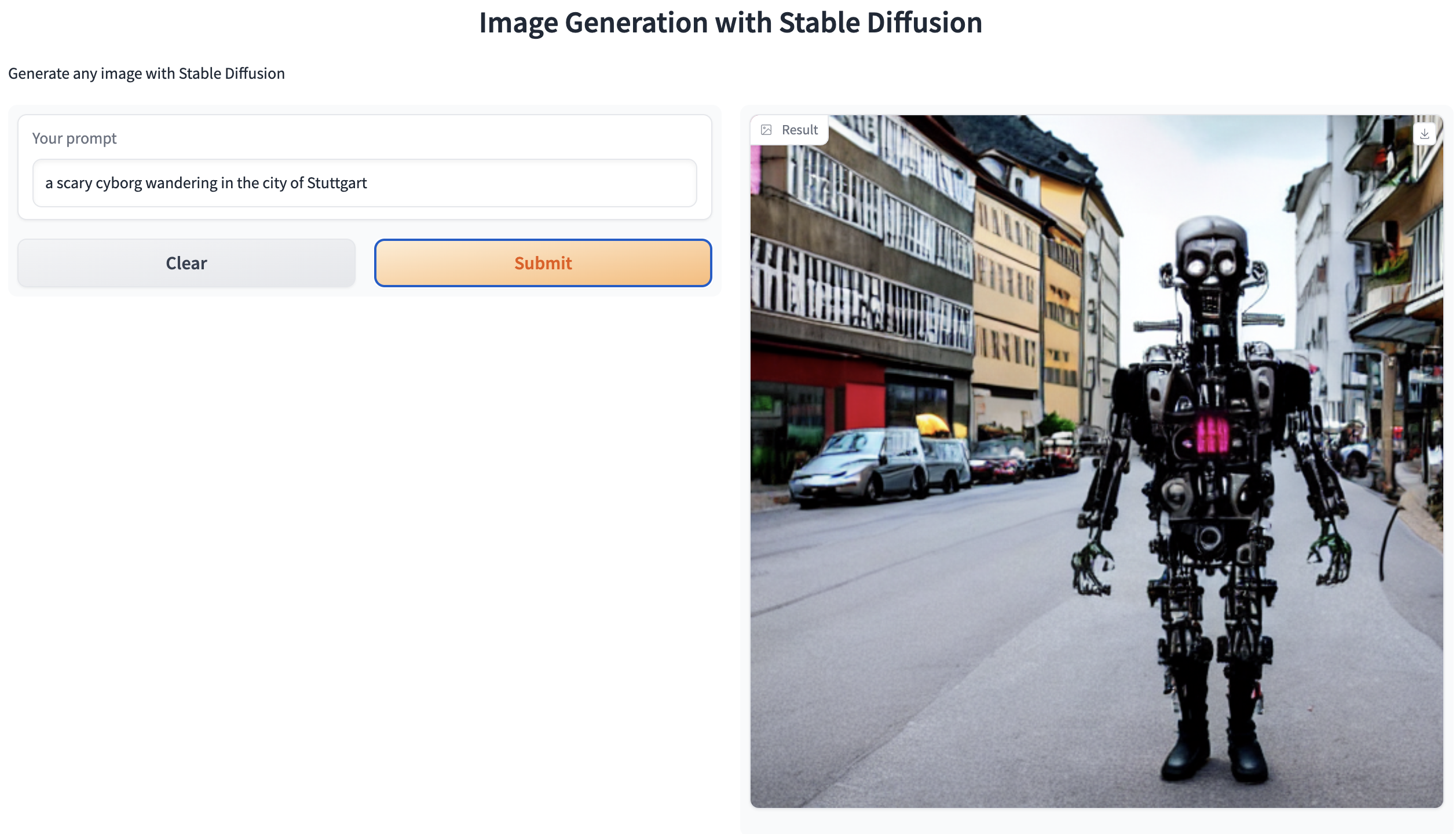
Output
Optional: API-Version
import gradio as gr

#A helper function to convert the PIL image to base64
#so you can send it to the API
def base64_to_pil(img_base64):
    base64_decoded = base64.b64decode(img_base64)
    byte_stream = io.BytesIO(base64_decoded)
    pil_image = Image.open(byte_stream)
    return pil_image

def generate(prompt):
    output = get_completion(prompt)
    result_image = base64_to_pil(output)
    return result_image

gr.close_all()
demo = gr.Interface(fn=generate,
                    inputs=[gr.Textbox(label="Your prompt")],
                    outputs=[gr.Image(label="Result")],
                    title="Image Generation with Stable Diffusion",
                    description="Generate any image with Stable Diffusion",
                    allow_flagging="never",
                    examples=["the spirit of a tamagotchi wandering in the city of Vienna","a mecha robot in a favela"])

demo.launch(share=True, server_port=int(os.environ['PORT1']))
Close apps
Advanced User Interface
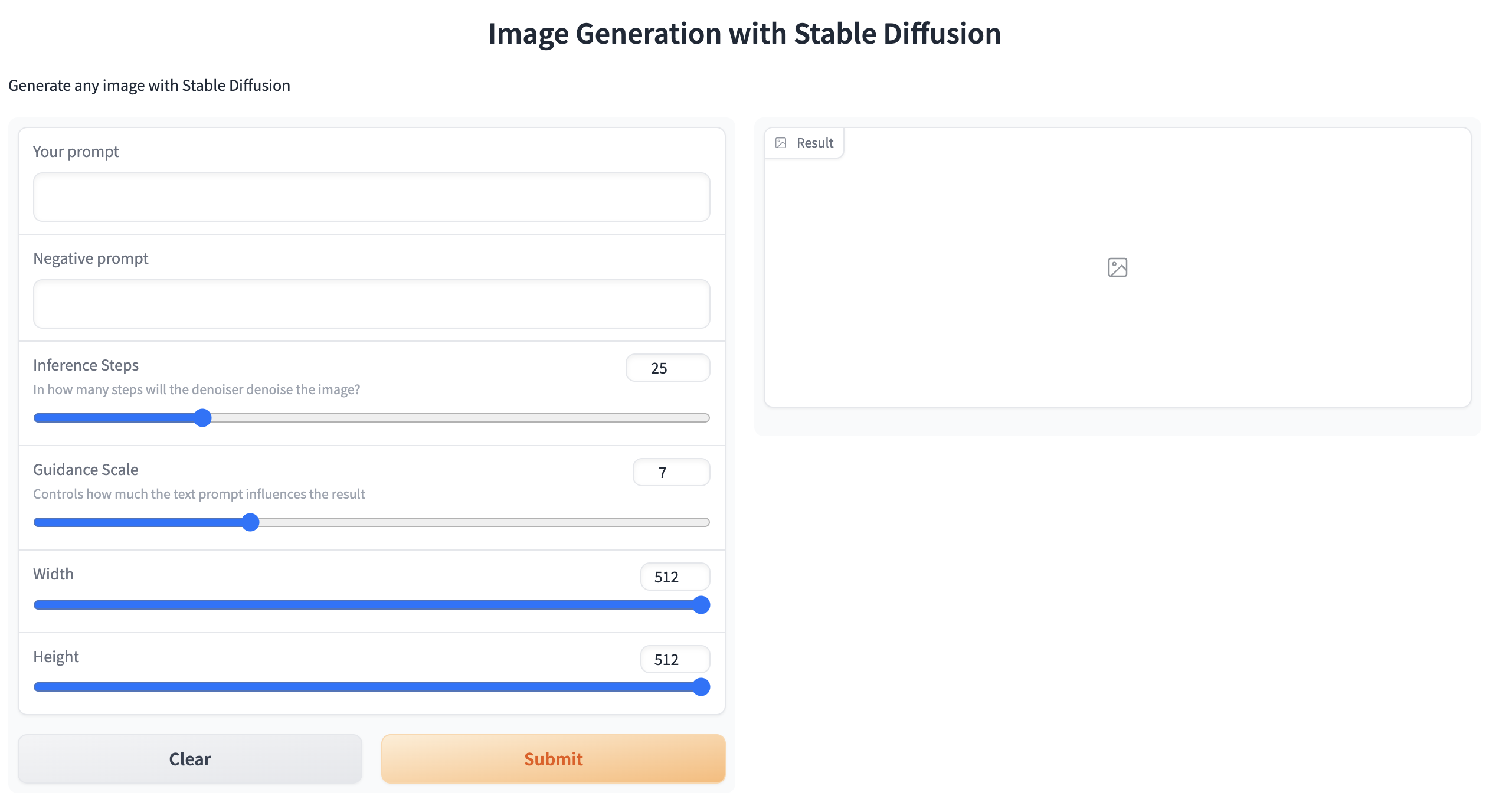
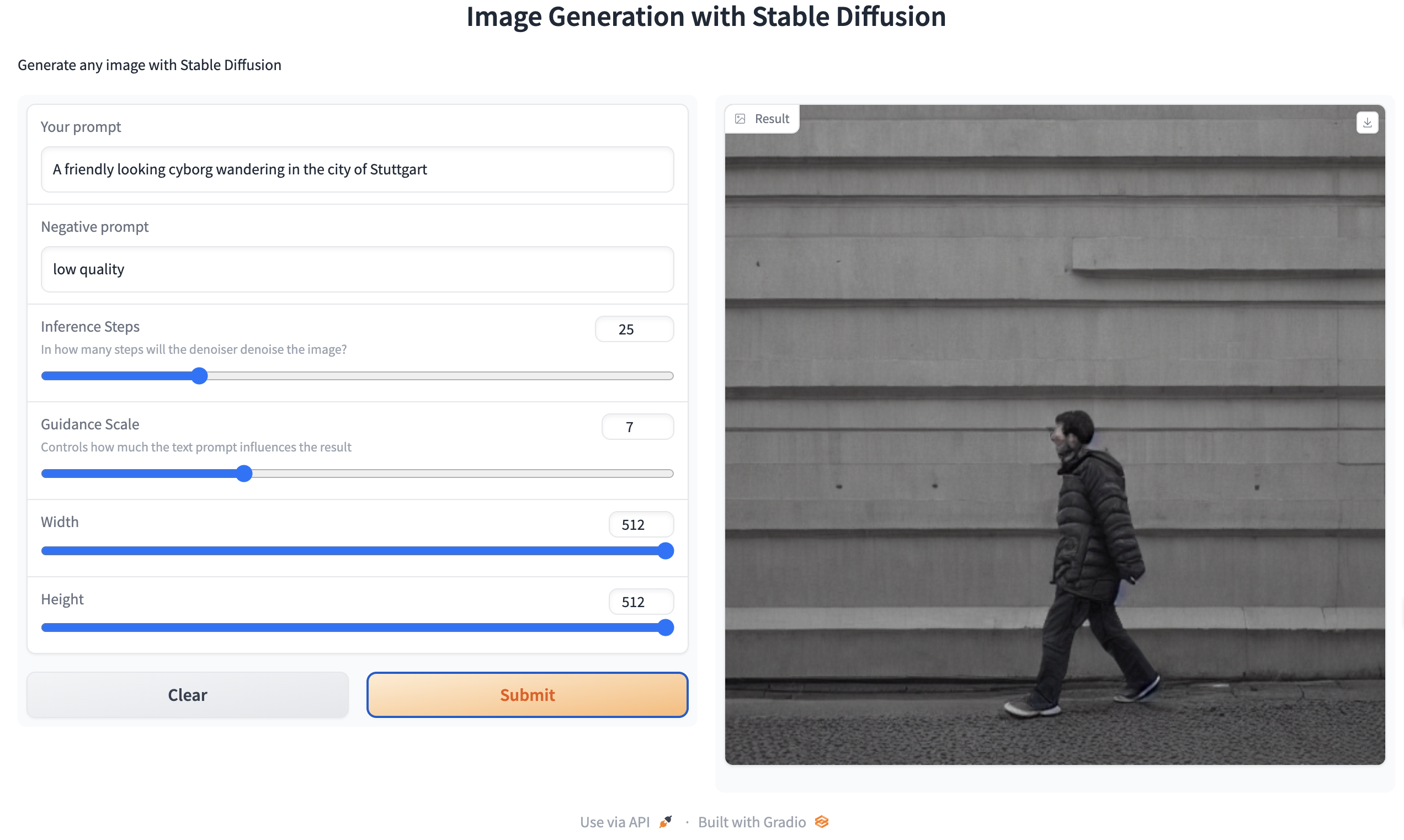
Building a more advanced interface
Gradio app
Note: The following code for the local app mimics the code of the API-version as close as possible.
def get_completion(inputs, parameters=None):
    data = {"inputs": inputs}
    if parameters is not None:
        data.update({"parameters": parameters})
    response = json.dumps(data)
    return pipe(response).images[0]


def generate(prompt, negative_prompt, steps, guidance, width, height):
    params = {
        "negative_prompt": negative_prompt,
        "num_inference_steps": steps,
        "guidance_scale": guidance,
        "width": width,
        "height": height
    }

    output = get_completion(prompt, params)
    return output


gr.close_all()
demo = gr.Interface(fn=generate,
                    inputs=[
                        gr.Textbox(label="Your prompt"),
                        gr.Textbox(label="Negative prompt"),
                        gr.Slider(label="Inference Steps", minimum=1, maximum=100, value=25,
                                  info="In how many steps will the denoiser denoise the image?"),
                        gr.Slider(label="Guidance Scale", minimum=1, maximum=20, value=7,
                                  info="Controls how much the text prompt influences the result"),
                        gr.Slider(label="Width", minimum=64,
                                  maximum=512, step=64, value=512),
                        gr.Slider(label="Height", minimum=64,
                                  maximum=512, step=64, value=512),
                    ],
                    outputs=[gr.Image(label="Result")],
                    title="Image Generation with Stable Diffusion",
                    description="Generate any image with Stable Diffusion",
                    allow_flagging="never"
                    )

demo.launch(share=True)
Gradio user interface
Model output
🤔
Optional: API-version
#A helper function to convert the PIL image to base64
# so you can send it to the API
def base64_to_pil(img_base64):
    base64_decoded = base64.b64decode(img_base64)
    byte_stream = io.BytesIO(base64_decoded)
    pil_image = Image.open(byte_stream)
    return pil_image

def generate(prompt, negative_prompt, steps, guidance, width, height):
    params = {
        "negative_prompt": negative_prompt,
        "num_inference_steps": steps,
        "guidance_scale": guidance,
        "width": width,
        "height": height
    }

    output = get_completion(prompt, params)
    pil_image = base64_to_pil(output)
    return pil_image

gr.close_all()
demo = gr.Interface(fn=generate,
                    inputs=[
                        gr.Textbox(label="Your prompt"),
                        gr.Textbox(label="Negative prompt"),
                        gr.Slider(label="Inference Steps", minimum=1, maximum=100, value=25,
                                 info="In how many steps will the denoiser denoise the image?"),
                        gr.Slider(label="Guidance Scale", minimum=1, maximum=20, value=7,
                                  info="Controls how much the text prompt influences the result"),
                        gr.Slider(label="Width", minimum=64, maximum=512, step=64, value=512),
                        gr.Slider(label="Height", minimum=64, maximum=512, step=64, value=512),
                    ],
                    outputs=[gr.Image(label="Result")],
                    title="Image Generation with Stable Diffusion",
                    description="Generate any image with Stable Diffusion",
                    allow_flagging="never"
                    )

demo.launch(share=True, server_port=int(os.environ['PORT2']))
Close apps
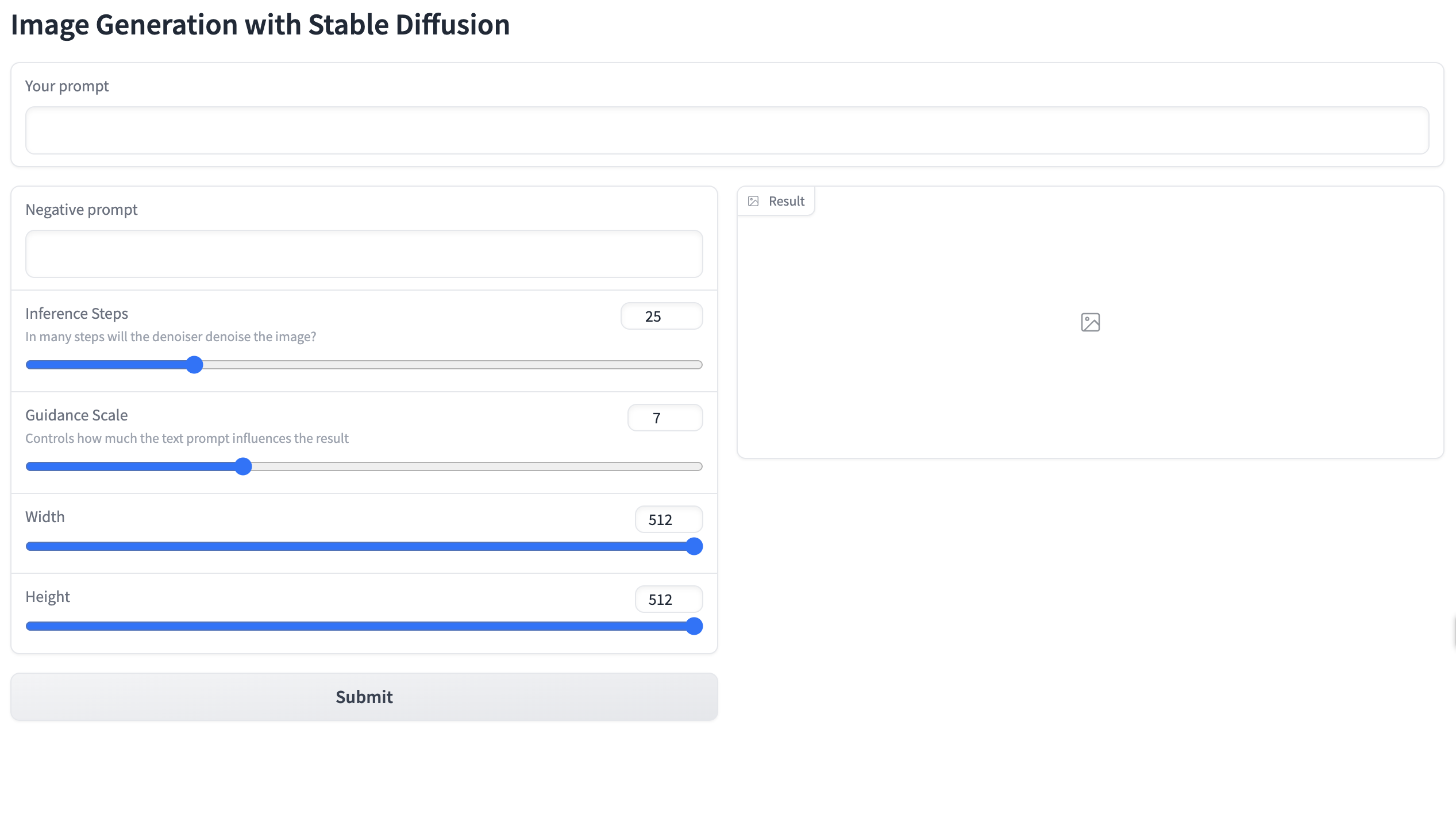
Gradio Blocks
Gradio example with Blocks
with gr.Blocks() as demo:
    gr.Markdown("# Image Generation with Stable Diffusion")
    prompt = gr.Textbox(label="Your prompt")
    with gr.Row():
        with gr.Column():
            negative_prompt = gr.Textbox(label="Negative prompt")
            steps = gr.Slider(label="Inference Steps", minimum=1, maximum=100, value=25,
                              info="In many steps will the denoiser denoise the image?")
            guidance = gr.Slider(label="Guidance Scale", minimum=1, maximum=20, value=7,
                                 info="Controls how much the text prompt influences the result")
            width = gr.Slider(label="Width", minimum=64,
                              maximum=512, step=64, value=512)
            height = gr.Slider(label="Height", minimum=64,
                               maximum=512, step=64, value=512)
            btn = gr.Button("Submit")
        with gr.Column():
            output = gr.Image(label="Result")

    btn.click(fn=generate, inputs=[
              prompt, negative_prompt, steps, guidance, width, height], outputs=[output])
gr.close_all()
demo.launch(share=True)
Gradio user interface
Optional: API Version
with gr.Blocks() as demo:
    gr.Markdown("# Image Generation with Stable Diffusion")
    prompt = gr.Textbox(label="Your prompt")
    with gr.Row():
        with gr.Column():
            negative_prompt = gr.Textbox(label="Negative prompt")
            steps = gr.Slider(label="Inference Steps", minimum=1, maximum=100, value=25,
                      info="In many steps will the denoiser denoise the image?")
            guidance = gr.Slider(label="Guidance Scale", minimum=1, maximum=20, value=7,
                      info="Controls how much the text prompt influences the result")
            width = gr.Slider(label="Width", minimum=64, maximum=512, step=64, value=512)
            height = gr.Slider(label="Height", minimum=64, maximum=512, step=64, value=512)
            btn = gr.Button("Submit")
        with gr.Column():
            output = gr.Image(label="Result")

    btn.click(fn=generate, inputs=[prompt,negative_prompt,steps,guidance,width,height], outputs=[output])
gr.close_all()
demo.launch(share=True, server_port=int(os.environ['PORT3']))
Gradio app with drop down menu
with gr.Blocks() as demo:
    gr.Markdown("# Image Generation with Stable Diffusion")
    with gr.Row():
        with gr.Column(scale=4):
            # Give prompt some real estate
            prompt = gr.Textbox(label="Your prompt")
        with gr.Column(scale=1, min_width=50):
            btn = gr.Button("Submit")  # Submit button side by side!
    with gr.Accordion("Advanced options", open=False):  # Let's hide the advanced options!
        negative_prompt = gr.Textbox(label="Negative prompt")
        with gr.Row():
            with gr.Column():
                steps = gr.Slider(label="Inference Steps", minimum=1, maximum=100, value=25,
                                  info="In many steps will the denoiser denoise the image?")
                guidance = gr.Slider(label="Guidance Scale", minimum=1, maximum=20, value=7,
                                     info="Controls how much the text prompt influences the result")
            with gr.Column():
                width = gr.Slider(label="Width", minimum=64,
                                  maximum=512, step=64, value=512)
                height = gr.Slider(label="Height", minimum=64,
                                   maximum=512, step=64, value=512)
    output = gr.Image(label="Result")  # Move the output up too

    btn.click(fn=generate, inputs=[
              prompt, negative_prompt, steps, guidance, width, height], outputs=[output])

gr.close_all()
demo.launch(share=True)
Gradio user interface
Optional: API Version
with gr.Blocks() as demo:
    gr.Markdown("# Image Generation with Stable Diffusion")
    with gr.Row():
        with gr.Column(scale=4):
            prompt = gr.Textbox(label="Your prompt") #Give prompt some real estate
        with gr.Column(scale=1, min_width=50):
            btn = gr.Button("Submit") #Submit button side by side!
    with gr.Accordion("Advanced options", open=False): #Let's hide the advanced options!
            negative_prompt = gr.Textbox(label="Negative prompt")
            with gr.Row():
                with gr.Column():
                    steps = gr.Slider(label="Inference Steps", minimum=1, maximum=100, value=25,
                      info="In many steps will the denoiser denoise the image?")
                    guidance = gr.Slider(label="Guidance Scale", minimum=1, maximum=20, value=7,
                      info="Controls how much the text prompt influences the result")
                with gr.Column():
                    width = gr.Slider(label="Width", minimum=64, maximum=512, step=64, value=512)
                    height = gr.Slider(label="Height", minimum=64, maximum=512, step=64, value=512)
    output = gr.Image(label="Result") #Move the output up too

    btn.click(fn=generate, inputs=[prompt,negative_prompt,steps,guidance,width,height], outputs=[output])

gr.close_all()
demo.launch(share=True, server_port=int(os.environ['PORT4']))
Close all apps
What’s next?
Congratulations! You have completed this tutorial 👍
Next, you may want to go back to the lab’s website
Jan Kirenz